05 - Step-by-Step Guide

Step-by-Step Guide
In short: This is the full walk-through of all four steps and every field. For the fast path, use Quick Start instead.
Quick Start gets you live in five minutes with safe defaults. This guide explains every choice behind those defaults, field by field, so you can steer the page exactly.
We will keep using Aerix Sport and the Matchpoint Elite racket as the example.
Quick tip: Most fields are optional and have sensible defaults. The more specific you are, the sharper the page. Fill the Essential fields first, then add Optional ones when you want more control.
Step 1: Template and setup
In short: Pick what the page looks like, set your brand look, and add the basics.
Pick a type, then a template
Choose your landing-page type first, then a template inside it. See The 12 Landing Page Types to match a type to your traffic. For Aerix cold traffic, we use the Advertorial type.
Set your brand look
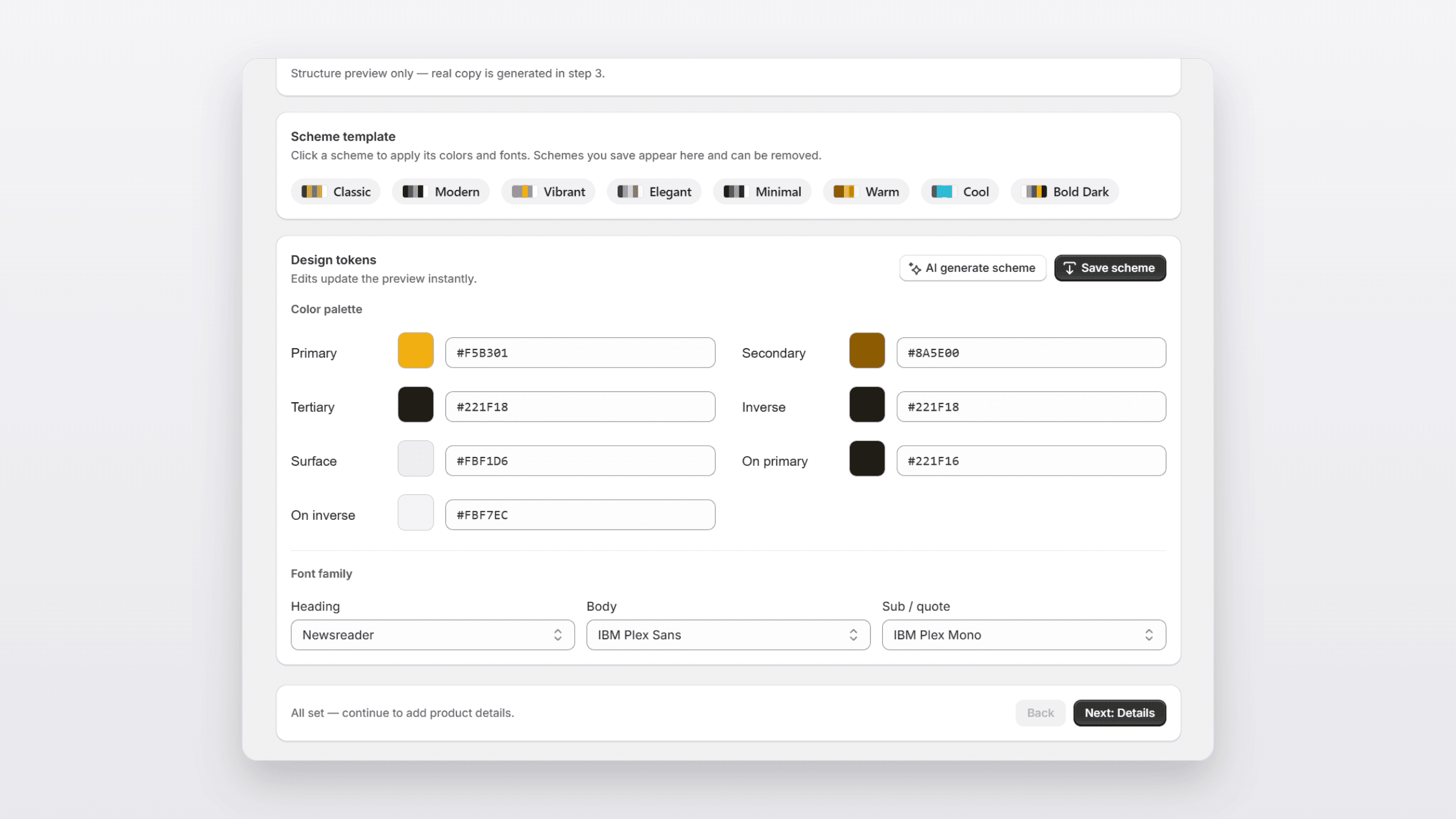
Set your brand colors and fonts as reusable settings, then save them as a scheme. Every future page pulls from that scheme, so your pages stay on brand without restyling each one. Logos and color schemes can also be generated from your brand colors.
Add the basics
Fill in a few facts that anchor the whole page:
Basic | What it is |
|---|---|
Product name | The product the page sells (Matchpoint Elite) |
Product type | The category (tennis racket) |
Destination URL | Where the buy button sends people |
Audience | Who you are writing for |
Step 2: The brief
In short: This is where you steer the writing. Fill the Essential fields, add Optional ones for more control.
Here is every field at a glance, then the detail for each.
Field | Essential? | What it drives |
|---|---|---|
Page title and URL handle | Essential | The headline and the page address |
Anchor phrase | Essential | The shared promise from your ad |
Persona and core pain | Essential | Who you write to and their main frustration |
Offer and mandatory CTA | Essential | The deal and the exact button text |
Raw features and facts | Essential | The true facts the AI writes from |
Awareness stage | Optional | How ready the visitor is |
Copy framework | Optional | The order of the argument |
Brand context | Optional | Your origin and story |
Competitor context | Optional | The rivals you lose sales to |
Claim guardrails | Optional | What the page must not say |
Target language | Optional | The language the page is written in |
Page title and URL handle
This drives the page headline and the page address. The handle you approve is exactly where the page is created in your store. Example: title "The Racket Built for Players Who Lose Control at Full Swing", handle matchpoint-elite.
Anchor phrase
The shared promise your ad and page both use, so the click stays warm. See message-match in Core Concepts. Example: "Control that holds up at full swing."
Persona and core pain
Who you write to, and the one frustration the page must name in the first thirty seconds. Example: "Competitive club players in their thirties who play two to three times a week and feel their racket get unstable on hard hits."
Offer and mandatory CTA
The full commercial offer and the exact button text the page must use. Example offer: "110 dollars, free shipping, 30-day on-court return." Example CTA: "Claim my Matchpoint Elite."
Raw features and facts
The hard facts the AI writes from. Stick to true, verifiable details only. Example: "300g unstrung, 16x19 string pattern, graphite frame, 100 square inch head."
Quick tip: Never paste a claim you cannot back up. The page is only as truthful as the facts you give it.
Awareness stage (optional)
How ready the visitor is, from Unaware to Most Aware. This shapes how much story the page tells before the pitch. See the awareness ladder in Core Concepts. Example: Problem-Aware, for players who feel the issue but have not named the cause.
Copy framework (optional)
The order the page makes its argument in. Flunnel includes seven; pick the one that fits your stage. Example: PAS, to name the control problem, make it sting, then resolve it.
Brand context (optional)
Your origin story and anything that builds trust in the brand itself. Example: "Founded by a former club coach who got tired of rackets that fade under pressure."
Competitor context (optional)
The two or three products you actually lose sales to, so the page can position against them. Example: the specific rival rackets a club player weighs against the Matchpoint Elite.
Claim guardrails (optional)
What the page must not say, so sensitive claims stay compliant. These rules travel with the page. Example: "Do not promise specific ranking or match-win improvements."
Target language (optional)
Generate the whole page in your market's language. Example: English for a US campaign.
Step 3: Generation
In short: Click Generate. Flunnel writes the page from your brief.
Flunnel writes the page from your brief. It maps your persona and angle, cross-references the pain point, composes the layout, and fills the template with your brand scheme.
Generation usually takes more than thirty seconds. The exact time depends on how long the page is and how detailed your brief is.

Step 4: Review and publish
In short: Preview on desktop and mobile, fix anything, then publish to your store or save a draft.
Preview the page on desktop and mobile to see how it reads on each.
If a section needs work, you can edit text inline or re-generate that one section. The full editing toolkit, including locking sections and version history, is covered in Editing Your Page.
When it is ready:
Publish to create the page in your Shopify online store at the handle you approved. It goes live on your store domain, ready for ads.
Set up your email flows once, so every sign-up from the page gets your Welcome emails. See Email Flows.
Save as a draft if you would rather keep iterating.

You are done
You now have a live page on your store. With your email flows set up, every sign-up it collects gets your Welcome emails. Point an ad at it and start testing.
Where to go next:
Editing Your Page for the full edit, lock, and version tools.
Templates to pick the right starting point for your next page.
Best Practices to write briefs that convert.
Back to The 12 Landing Page Types · Continue to Editing Your Page
Share: